Bank Statement Analyzer: What a Bank Statement Report Shows
What a bank statement analyzer does, what Bayainy's bank statement report contains, from receipts and categories to the balance check, and how to read it.
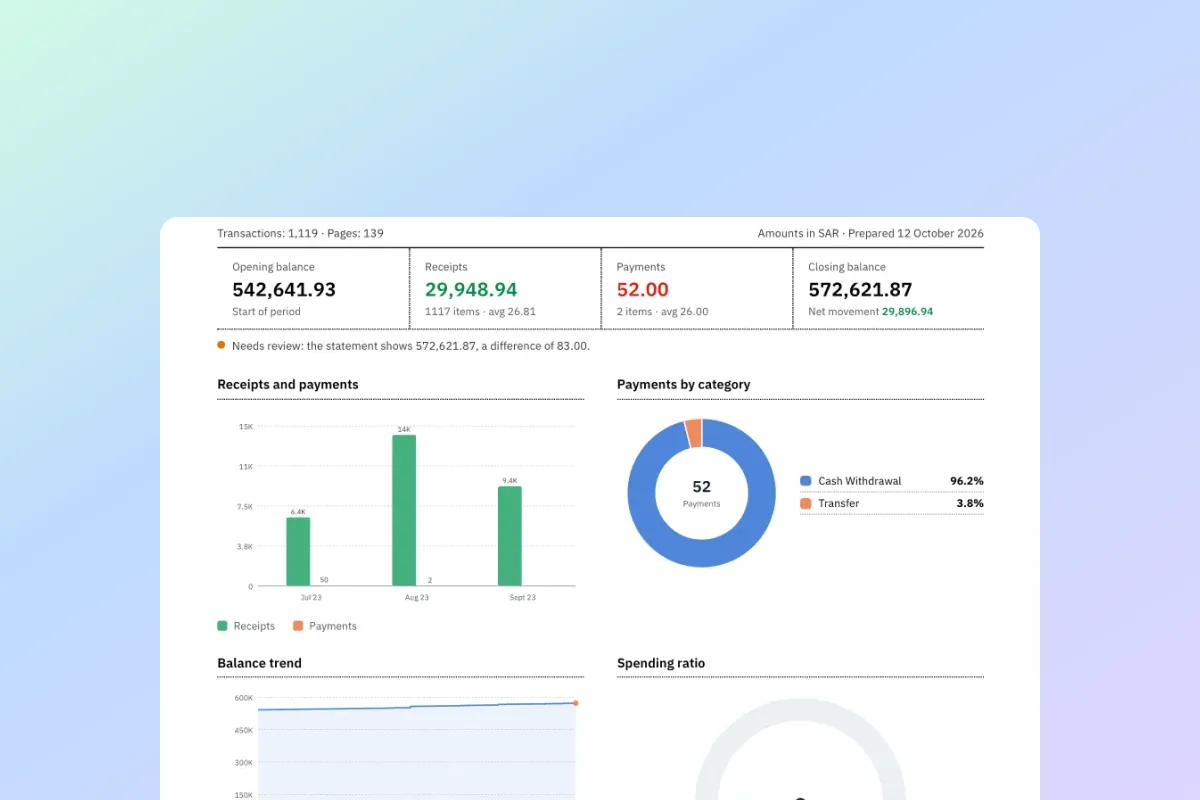
A bank statement tells you what happened, line by line. A bank statement report tells you what it means: how much came in, where the money went, and whether the numbers add up.
This guide covers what a bank statement analyzer does, what is in Bayainy's bank statement report, and how to read it step by step.
What is a bank statement analyzer?
A bank statement analyzer reads every transaction on a statement and summarises it: total in and out, spending by category, and how the balance moved over the period.
A good one also checks the numbers. If one transaction is lost while reading the PDF, every total in the report is wrong, so the check matters more than the charts.
What is in the bank statement report
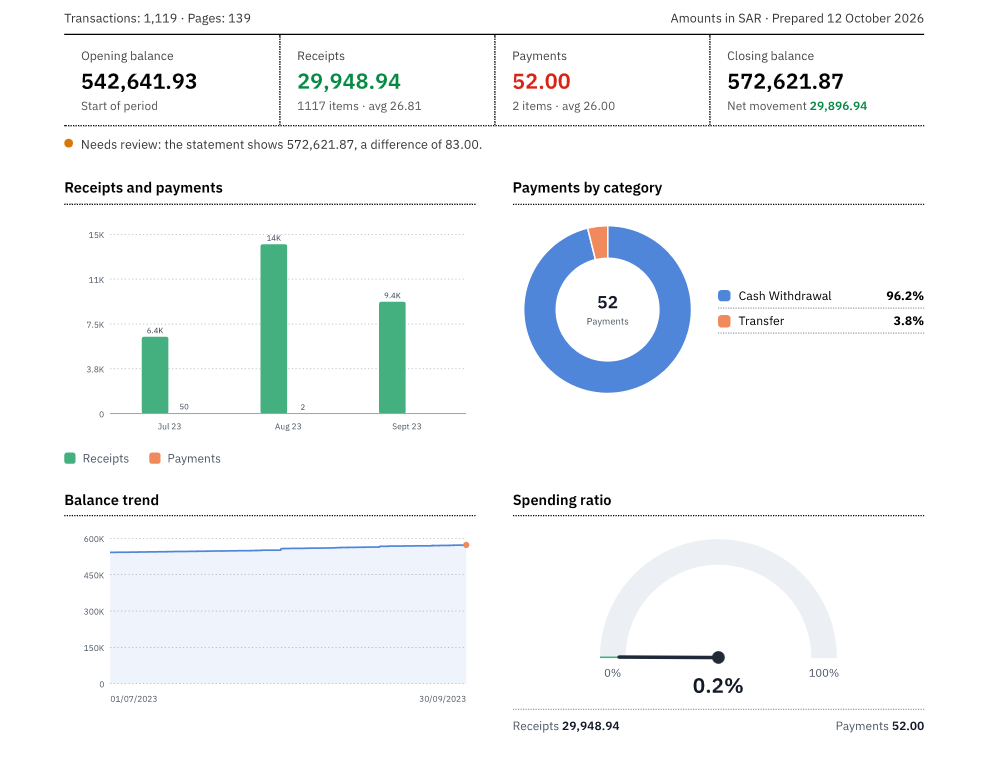
| Part | What it shows |
|---|---|
| Headline figures | Opening balance, receipts, payments and closing balance, with the number of items and the average |
| Balance check | "Reconciled", or "Needs review" with the exact difference |
| Receipts and payments | Money in against money out by month, or by quarter or year for long statements |
| Payments by category | Where the money went, as a share of all payments |
| Balance trend | The running balance after each transaction |
| Spending ratio | Payments as a share of receipts |
| Account summary | Opening balance + receipts − payments, compared with the closing balance on the statement |
| Category by month | The top categories in and out for each month, with subtotals and net movement |
| Transaction detail | Every transaction, grouped by month with a subtotal for each |
How to read a bank statement report in 4 steps
- Start with the balance check. "Reconciled" means every transaction agrees with the running balance printed on the statement. "Needs review" shows the difference: look for a missing or doubled line before anything else.
- Read the four headline figures. Receipts minus payments is the net movement, and it should equal the closing balance minus the opening balance.
- Look at the spending ratio. Above 100% means more went out than came in over the period.
- Use the category table to spot changes: a category that jumps in one month is usually the first question for the client.
A worked example
One month of a statement, with figures for illustration:
| Item | Amount (SAR) |
|---|---|
| Opening balance | 20,000.00 |
| Add: receipts (12 items) | 48,500.00 |
| Less: payments (37 items) | (51,300.00) |
| Closing balance, computed | 17,200.00 |
| Closing balance per statement | 17,200.00 |
| Difference | 0.00 |
The difference is zero, so the statement is reconciled. The spending ratio is 51,300 ÷ 48,500 = 105.8%: payments beat receipts by 2,800 SAR, which is exactly how much the balance fell.
Bank statement analyzer or an Excel sheet?
You can build the same summary in Excel with SUMIF and a pivot table, once you convert the bank statement to Excel. The real work is getting clean rows and the right categories.
The report does both, and adds the balance check that a sheet on its own does not. See how each line is categorised.
Who uses a bank statement report
- Accountants: a monthly review for each client, with the client's name at the top of the report.
- Business owners: where the money goes, without reading every line.
- Anyone reviewing their income and spending, for example before a loan application.
How to get the report in Bayainy
- Upload your PDF bank statement. Bayainy extracts every transaction and checks the running balance.
- On the result page, choose "PDF Report" in English or Arabic, then save it as a PDF from the print window.
- For clients: in the dashboard, add the client's name so "Prepared for" appears at the top of the report.
Frequently asked questions
What is a bank statement analyzer?
A tool that reads every transaction on a statement and summarises it: totals, spending by category and the balance over time, with a check that the numbers add up.
What does "Needs review" mean on the report?
The closing balance computed from the transactions does not match the closing balance on the statement. The report shows the difference so you can find the missing or doubled line.
Is the bank statement report free?
Converting a statement to Excel is free for one file of up to 3 pages every 24 hours. The PDF report is included in every paid plan, from 29 SAR a month.
Which languages is the report in?
English or Arabic; you choose when you print it.
Convert your statement and get the report
Upload a PDF and get Excel plus a balance-checked report
Try Bayainy for Free
Upload your bank statement and get a classified Excel in seconds. 3 pages free, no signup.
Get Started Free