
Convert PDF Bank Statement to Excel in Seconds
Upload a PDF bank statement from any bank, digital or scanned, and download a clean Excel file with every balance checked.
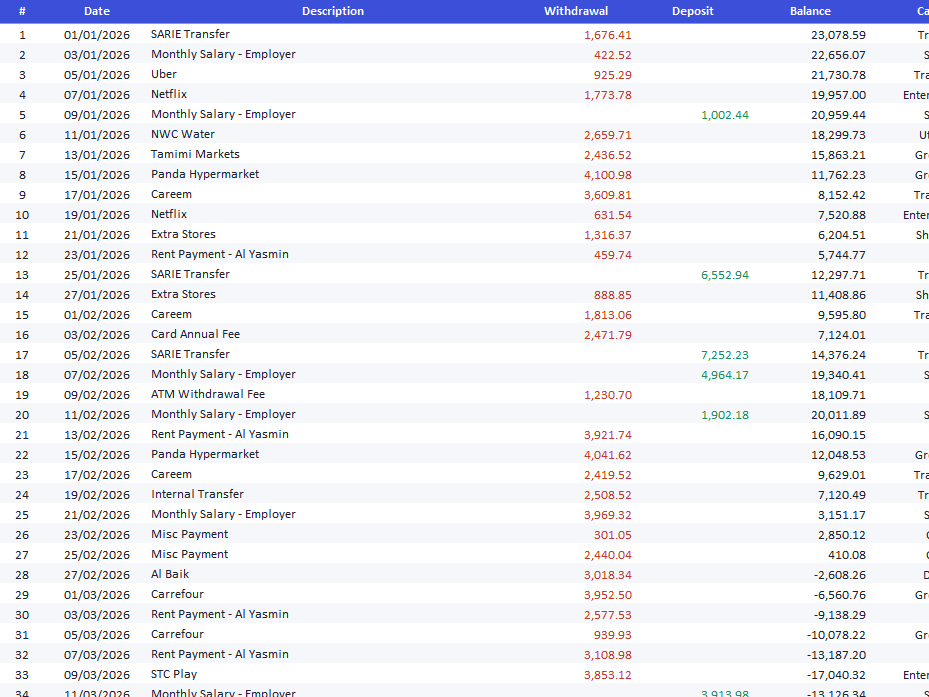
The Excel format you get from a PDF bank statement
Every statement converts to the same format: one row per transaction, ten columns, and a Summary sheet with totals.
| # | Row number |
|---|---|
| Date | Transaction date |
| Description | The bank's description, in Arabic or English |
| Withdrawal | Money out, as a number |
| Deposit | Money in, as a number |
| Balance | Running balance, checked against the statement |
| Category | Accounting category, such as salary, rent or transfer |
| Ref | Reference number, when the bank prints one |
| Page | The statement page the row came from |
| Notes | Your own notes, added on the review screen before export |
Why convert a PDF bank statement to Excel with Bayainy
- Ready for accounting
- Each transaction gets an accounting category, and the file includes a Summary sheet with totals by category.
- 1,300+ banks in 121 countries
- Arabic, English and bilingual statements, digital or scanned. Every row is checked against the running balance, and rows that do not add up are flagged.
- Your files stay private
- Each PDF is processed in an isolated environment and deleted as soon as your result is ready. We never sell or share your data.