How to Convert Bank Statements to Excel (PDF to Excel)
How to convert bank statements to Excel: export from your bank, use Excel's PDF import, or a converter. See the right Excel format and how to check it.

Your bank gives you a PDF. Your accountant, your accounting software and your own spreadsheet want Excel. That gap is where hours disappear.
This guide shows how to convert bank statements to Excel in three ways, what the right Excel format looks like, and how to check the result in one minute.
How to convert bank statements to Excel: 3 ways
| Method | Speed | Risk of errors | Best for |
|---|---|---|---|
| Copy by hand | Slow, hours for long statements | Typos and missed rows | A one-page statement |
| Export from your bank | Fast | Recent months only, different layout per bank | Your own account |
| Excel's PDF import or a general PDF tool | Fast | Merged columns, two-line descriptions split into two rows, garbled Arabic | Simple English statements |
| A bank statement converter | Seconds | Every row checked against the running balance | Any bank, many statements |
How to export bank statements to Excel from your bank
Some banks let you download transactions as Excel or CSV in online banking. Look for an export option on the transactions or statements page.
The catch: it usually covers recent months only, and every bank uses a different layout. Accountants also tend to receive PDFs from clients, without access to their online banking.
How to use Excel's own PDF import
In Microsoft 365 for Windows, go to Data, Get Data, From File, From PDF. It works well on clean tables.
Bank statements usually need tidying afterwards: long descriptions split into two rows, the table header repeats on every page, and amounts arrive as text instead of numbers.
How to convert a bank statement PDF with a converter
- Upload the PDF, digital or scanned.
- The converter reads every transaction: date, description, amount and balance.
- Each row is checked against the running balance, down to the closing balance.
- Download Excel, CSV or a file ready for your accounting software.
With Bayainy, one file of up to 3 pages is free every 24 hours, no sign-up. Try the PDF to Excel converter.
Bank statement Excel format: the columns you should get
A good file has one row per transaction and the same columns whatever the bank. These are the columns in Bayainy's Excel file:
| Column | What it holds |
|---|---|
| # | Transaction number, in order |
| Date | Transaction date in one sortable format |
| Description | The description as the bank wrote it |
| Withdrawal | Money out |
| Deposit | Money in |
| Balance | The balance after the transaction |
| Category | An automatic category, such as Salary, Rent or Fees |
| Ref | The reference number, when there is one |
| Page | The page in the PDF, to trace any row back |
| Notes | Notes, such as rows that need a review |
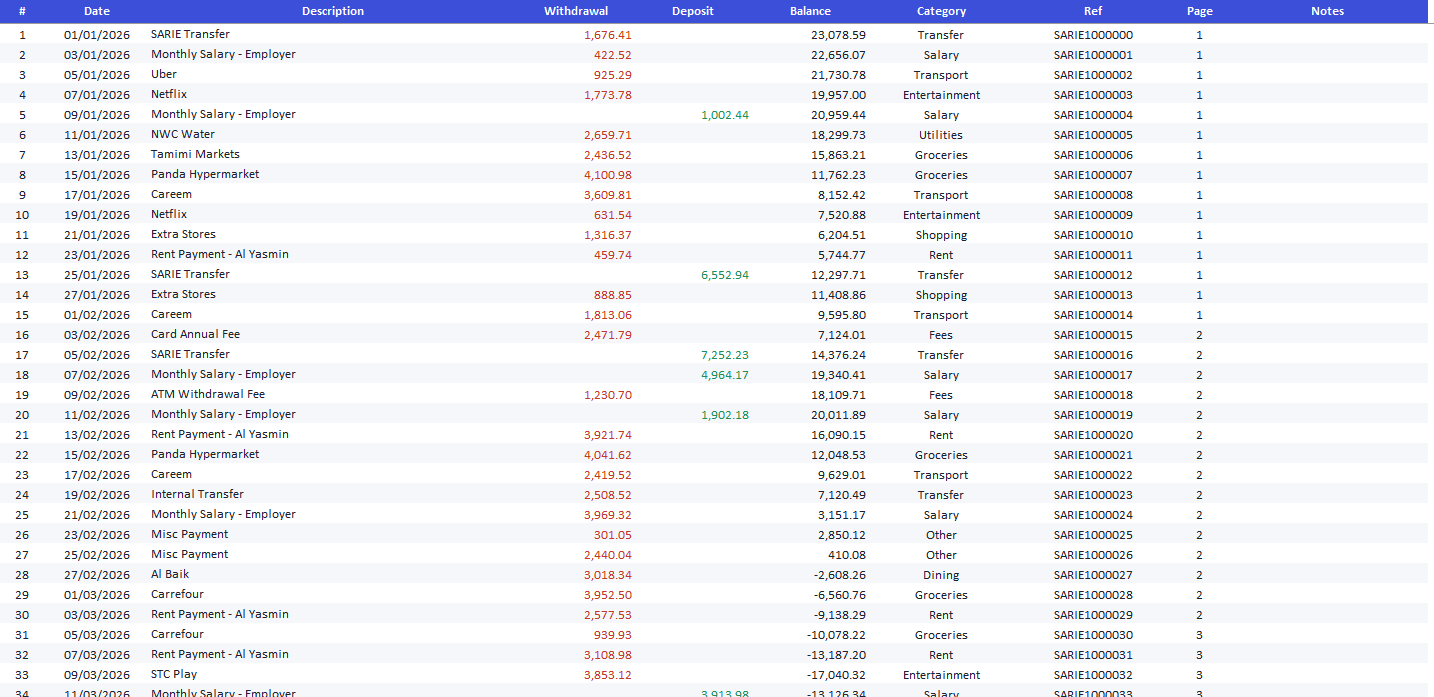
A second Summary sheet holds total withdrawals and deposits and a chart of spending by category.
How to check the Excel file is right
- Opening balance + deposits − withdrawals = the closing balance on the statement.
- The row count is close to the number of transactions in the statement, with no blank or repeated rows.
- Check 3 random rows against the PDF, using the Page column.
If the balance does not match, a transaction is missing or doubled. Bayainy flags those rows instead of hiding them.
Why general PDF converters get bank statements wrong
We ran into each of these while building Bayainy, and they are what most often breaks a file:
- A description on two lines becomes two transactions.
- An amount glued to the description text gets lost.
- A deposit lands in the withdrawal column.
- A summary page is read as if it were transactions.
That is why every row is checked against the running balance before you get the file. More in how bank statement data extraction works.
Merge several bank statements into one Excel file
If you have statements from several banks, paid plans merge them into one Excel file with the same columns, so you can reconcile and analyse them together.
Frequently asked questions
How do I convert a bank statement PDF to Excel for free?
With Bayainy, one file of up to 3 pages is free every 24 hours, no sign-up. You can also use Excel's PDF import and tidy the result by hand.
Can I convert a scanned bank statement to Excel?
Yes. Scanned statements are read with AI and then checked against the balance, the same as digital ones.
Does it work with Arabic bank statements?
Yes. Arabic, English and bilingual statements are supported, and descriptions stay as the bank wrote them.
My bank statement PDF has a password. What do I do?
Open it with the password and save it as a new PDF without one. Bayainy does not open locked files. See how to get a bank statement.
Can I import the file into QuickBooks or Xero?
Yes, or export straight to QBO for QuickBooks or a Xero-ready CSV.
Microsoft: Import data from a CSV, HTML or text file
Official Microsoft documentation on bringing external data into Excel
PDF to Excel Converter
Convert a bank statement PDF to Excel in seconds, with every balance checked
Supported Banks
Find your bank among 1,300+ banks in 120+ countries
Try Bayainy for Free
Upload your bank statement and get a classified Excel in seconds. 3 pages free, no signup.
Get Started Free